
Best Baby Sleep App: What to Look For Before You Pick One
Sleep apps split in two — trackers that record what happened, and coaches that predict what should. Which one you need, and what matters at 2am.
For a newborn, the best baby sleep app is usually a plain tracker. It should start and stop a sleep in a tap or two, let you fix times afterwards, work in the dark, and keep one shared record with feeds on the same timeline. Nap-prediction coaches and settling programs have more to work with once sleep falls into a pattern.
Which kind of sleep app does your baby need?
Most families with a newborn need a sleep tracker, which records when each sleep started and ended. A sleep coach predicts nap times or gives you a settling program, and most coaches still need you to log each sleep. A monitor watches your baby asleep, which makes it a safety product, and Red Nose Australia says healthy babies don't need one.
Each kind answers a different question:
- A tracker answers "how much did she sleep today, and when did that nap end?" It's the record you show the child health nurse, hand to your partner at the shift change, and check when last night felt unusual.
- A coach answers "when should the next nap be?" or "how do I settle her?" It predicts wake windows or sets a program by age, usually from guidance built on other babies plus what you log.
- A monitor watches your baby while they sleep, with a camera or a breathing or movement sensor. Whether an app or monitor can keep your baby safe is covered further down.
If you came for sleep numbers, our newborn sleep guide covers how much sleep is usual by age, wake windows and what a sleep regression really is.
What a newborn sleep tracker does in the first 8 weeks
A newborn sleep tracker records when each sleep started and ended, beside the feeds. For the first 8 weeks, that record is the whole job. Newborns sleep in short bursts day and night, so there's no settled routine for an app to coach. The log gives you a true account of the last 24 hours when you can't remember it.
Australian guidance puts the normal range wide:
- Raising Children Network(opens in a new window): 14 to 17 hours of sleep in 24 hours for newborns, in short bursts of 2 to 3 hours, day and night.
- Pregnancy, Birth and Baby(opens in a new window): 11 to 19 hours of sleep in 24 hours from birth to 3 months, in "lots of short cycles".
A daily total will land somewhere in that spread, and on its own it says very little. Our newborn sleep guide has the full table by age.
The pattern changes slowly. Raising Children Network says that between 1 and 3 months, your baby might start waking less often and having longer periods of sleep at night. A record kept from the early weeks is how you'll notice that longer stretch when it arrives.
What a tracker can and can't tell you at 0 to 8 weeks
- Total sleep: A newborn sleep log can show you how much your baby slept in the last 24 hours, and in what pieces. It can't tell you whether that amount is right for your baby.
- Longest stretch: It can show how long the longest stretch was, and when it happened. It can't tell you why your baby won't settle.
- Night wakes: It can show how many times the night broke, and which wakes were feeds. It can't tell you whether your baby is breathing safely while asleep.
- Last night: It can show whether last night was unusual, or only felt that way. It can't tell you whether a pattern is a problem.
Those questions need a nurse or GP. Pregnancy, Birth and Baby says to see a doctor if your baby is crying a lot and having trouble sleeping. It also says to talk to a doctor or child health nurse if you feel you can't cope with the crying, or it's affecting your mood.
The Pregnancy, Birth and Baby helpline, 1800 882 436, connects you with a maternal child health nurse from 7am to midnight (AET), 7 days a week.
If your baby was premature or small at birth, your paediatrician or child and family health nurse might set a limit on how long they sleep at night before you wake them for a feed.
Raising Children Network notes this for babies who are premature, low birth weight or have other health or growth concerns. A written record of each stretch makes that limit easy to keep.
What to log for a newborn
Log only what you'll still manage at 2am:
- The start and end of every sleep, day and night. The length comes from those two times.
- Every feed, in the same place. Raising Children Network says newborns usually wake several times a night for feeds, so most night wakes will pair with one.
- A short note when something's different, such as a nap that only happened in the pram, a long resettle or a baby who's unwell. Skip notes on ordinary days.
That's enough to answer "was last night worse?", to hand the night over to a partner, and to show your nurse or GP what the last week actually looked like.
Can a sleep app or monitor keep your baby safe?
No. A sleep app keeps a record, and it can't tell you whether your baby is breathing safely. Red Nose Australia says there is no scientific evidence that any type of baby monitor prevents Sudden Unexpected Death in Infancy (SUDI), including SIDS or fatal sleeping accidents. Safe sleep comes from how and where your baby sleeps.
Red Nose says monitors are "not recommended" for that purpose, and should only be used "under medical advice and monitoring" for specific medical conditions. Its monitor guidance(opens in a new window) names room-sharing, not bed-sharing, for the first 6 months as the most effective way to reduce SUDI risk.
How and where your baby sleeps is covered by Red Nose's six safe sleep recommendations(opens in a new window), starting with always placing your baby on their back to sleep.
healthdirect(opens in a new window) lists signs that your baby may need urgent and immediate medical care, including being floppy or less responsive to things around them, or breathing rapidly, noisily or with difficulty. Call triple zero (000) or go to the nearest emergency department.
If your baby is under 3 months and has a fever above 38°C, healthdirect says to call 000 or go to the emergency department immediately. If you're unsure how serious it is, call healthdirect on 1800 022 222 at any time to speak to a registered nurse.
What to look for when you choose a sleep app
Judge a sleep app by the hardest log of the day: the 2am wake, one-handed, with the lights off. It should start and stop a sleep in a tap or two, let you fix a time afterwards, and have a dark theme. Both caregivers should write into one shared record, with feeds on the same timeline as sleep.
It works at 2am, one-handed
You log sleep in the worst conditions: one hand, no light, half-asleep, and often twenty minutes after the sleep started or ended. Three things decide whether you're still logging in month three:
- A tap or two to start or stop a sleep, with no form, date picker or category choice.
- Easy time fixes. You will log the 2am wake at 2:40am. If correcting it takes four screens, you'll stop bothering, and the record stops being true.
- A dark theme. A white screen at 2am wakes you both up properly.
Charts and averages only matter if the record underneath survived the night shift.
Both caregivers write into one record
The night is usually split, and whoever is off shift is asleep. The sleep record only works if both people write into the same one. Two separate records of one night are worse than a notepad on the bench.
Before you commit, check three things. Is a second caregiver included on the free plan, or a paid extra? Do both people see the same night straight away? Can the person who slept through the 3am wake see it when they get up?
Sleep and feeds sit on one timeline
In the first 8 weeks, sleep and feeds run as one rhythm. Raising Children Network says newborns usually wake several times a night for feeds, and Pregnancy, Birth and Baby suggests a "feed-play-sleep" pattern during the day. With sleep in one app and feeds in another, you're stitching the two together at 3am.
On one timeline, the questions a newborn week raises answer themselves:
- Was the long stretch after a big feed?
- Which night wakes were feeds, and which were resettles?
- Is the longest sleep moving later into the night?
- Did a short nap end on its own, or because it was time to feed?
If you want one app for tracking baby sleep and feeding, pick one that holds both on the same day view for everyone on the night shift. For how night feeds change after the newborn weeks, our guide to night feeds by age covers what's typical and when babies need fewer.
How the main sleep apps differ
The main sleep apps differ in what they do with your log. Huckleberry predicts nap times on its paid plans. SleepWellBaby is a paid sleep and settling program. Nara Baby, Glow Baby and Baby Daybook are general trackers that log sleep beside feeds and nappies, and some add sleep schedules or nap predictions.
Each entry below was checked in September 2026, and the list is in no particular order. BabyLog, which we make, has its own section after this one.
- Huckleberry: a tracker built around sleep, with free logging and caregiver sync. Its SweetSpot nap predictions(opens in a new window) start from 2 months on the paid plans, and the Australian App Store lists Huckleberry Plus from A$16.99 (checked September 2026).
- SleepWellBaby: a sleep and settling program by age for children from 0 to 3, developed in consultation with Tresillian, with tracking and a routine planner. Its website lists $19.99 a month, $49.99 a quarter or $159.99 a year (checked September 2026).
- Nara Baby: a calm, simple tracker with a sleep timer and sleep graphs. Its App Store listing(opens in a new window) also describes a nap routine based on wake windows.
- Glow Baby: a general tracker with a parenting community. Its App Store listing(opens in a new window) describes personalised sleep schedules and expert tips.
- Baby Daybook: a broad general tracker. Its Premium plan(opens in a new window) lists sleep predictions, the full timeline history and advanced statistics.
Prices can change at any time. For current pricing, see Huckleberry's App Store listing(opens in a new window) and the SleepWellBaby website(opens in a new window).
Sleep is one part of the day, and most families choose an app on the whole of it. Our overview of the best baby tracker in Australia compares the same apps across feeds, nappies, growth, sharing and price. If cost decides it, best free baby tracking app covers where each free plan stops.
What BabyLog does for sleep
BabyLog tracks sleep and doesn't coach it. We make it, so read this as our account of our own app. The free plan covers the sleep log, timers, timeline, calendar and summary views going back 14 days, and sharing with other caregivers. Pro adds full history, your baby's own sleep averages, a next-nap estimate and nap reminders.
On the free plan
- A sleep timer in two taps. Open Sleep and tap start; when your baby wakes, stop it from the same sheet. Either time can be corrected afterwards from the entry itself, and the running timer is shared with other caregivers.
- Night sleep and naps, counted separately. The day summary splits night sleep from naps using the day and night times you set for your baby, and counts the night's wake-ups.
- Sleep, feeds and nappies on one colour-coded day, so a broken night reads as a shape at a glance.
- A calendar and a sleep summary. The calendar lays each day out as a column. The sleep summary shows average sleep per day, night sleep, naps, and a bedtime and wake-up trend.
- One shared record. Invite whoever else is on the night shift with a six-digit code. Each of you logs from your own account into the same night.
- Made for 2am. A dark theme, and a left- or right-hand mode that moves the main buttons under your thumb. Logs save on the device first, so a 2am entry doesn't need a connection once you've signed in on that phone.
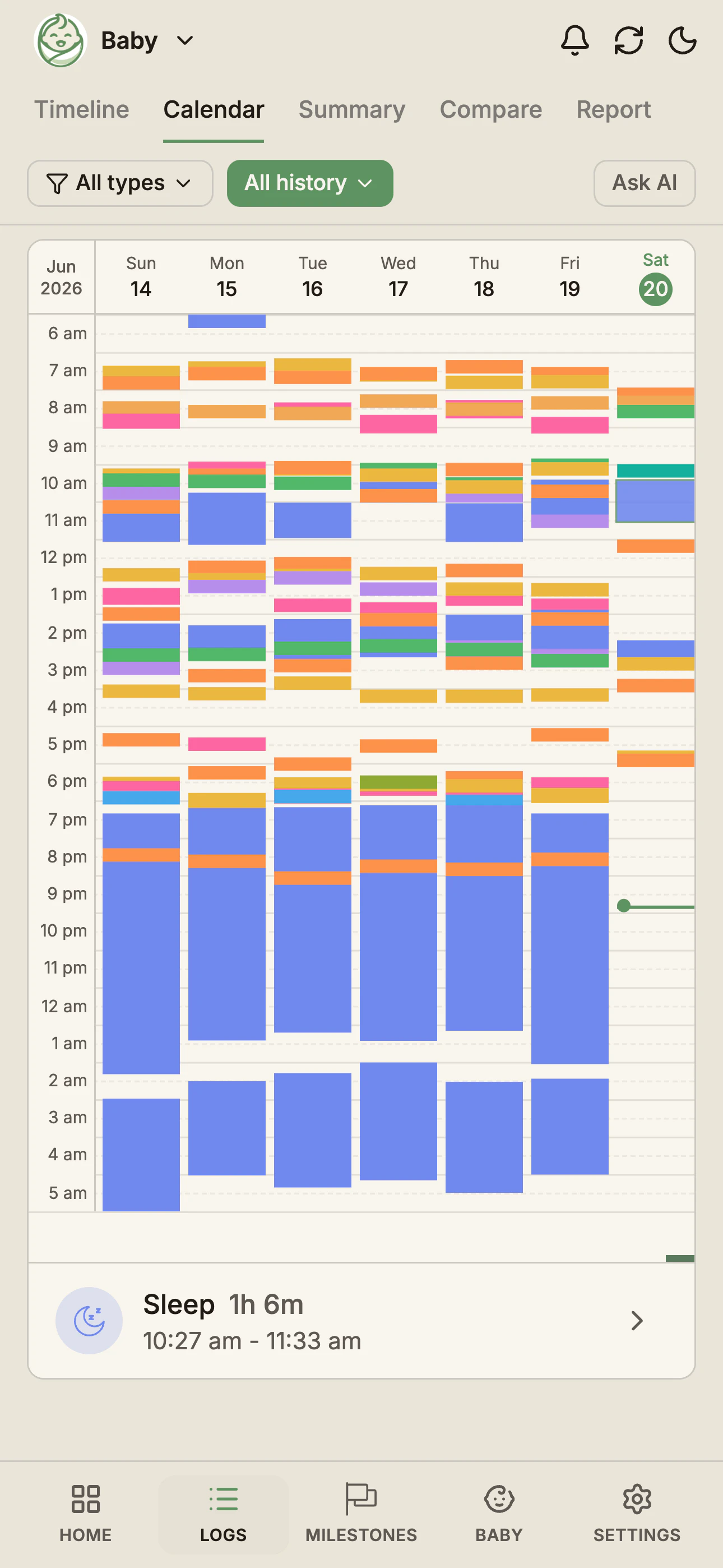
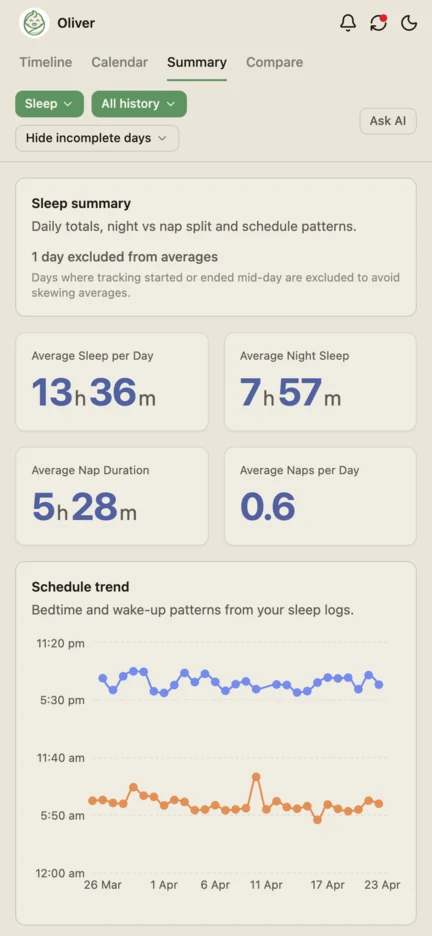
The sleep tracker page shows the sleep log and the sleep summary in more detail. The sleep log, timers, both views and sharing are all on the free plan, so you can start free and log tonight's sleeps.
With Pro
- Full history in the timeline, calendar and summary.
- Your baby's own averages, such as their usual daily sleep and usual naps per day, to set today against.
- A next-nap estimate on the home screen, worked out from when your baby last woke and the usual awake time for their age. Treat it as an estimate, and check it against your own record.
- Nap reminders, which can notify you when your baby has been awake long enough for a nap.
If those would help, you can choose Pro.
Common questions
Ready to start tracking?
BabyLog works on any device — iPhone, Android, tablet, or desktop. Setup takes two minutes.
Keep reading

BabyLog vs Baby Daybook: Mainstream Tracker vs Low-Effort, Made in Australia
A fair side-by-side comparison of BabyLog and Baby Daybook — daily logging effort, reviewing the day, caregiver sharing, offline use, data export and multilingual support — for parenting in Australia, picking between them.

BabyLog vs BabyConnect: Detailed Records vs Low-Effort Daily Logs
A fair side-by-side comparison of BabyLog and BabyConnect — daily logging effort, structured records, reviewing the day, sharing, offline use, data export and pricing — for parenting in Australia, deciding between them.