
How to Keep Both Parents in Sync with Baby Care Tracking
Sleep-deprived parents shouldn't have to text 'when was the last feed?' — here's how BabyLog keeps everyone on the same page across iPhone and Android.

A shared baby tracker keeps both parents in sync: you each log feeds, sleeps and nappies to the same record from your own phone, and either of you can check it at any hour. The app does half the job. The other half is agreeing what you both log, who logs it and who else gets to see it.
The first part of this guide covers those habits. For the app steps, jump to setting up sharing.
Why shared tracking matters
Shared tracking matters because a newborn's day runs in short loops that two tired people hand back and forth. When only one parent logs, the other guesses. A shared record means whoever picks up the baby knows when the last feed, sleep and nappy happened, without waking the other parent to ask.
Every household with a newborn asks the same three questions, several times a day:
- "When was the last feed?"
- "Did you change her?"
- "How long has she been asleep?"
Gaps in the answers lead to a doubled feed, a missed nappy change, or nobody knowing when the last sleep ended.
A shared log closes those gaps:
- Handovers take a glance. The parent taking over sees what happened on the other's shift.
- Nobody has to text. Open the log and check.
- Appointments are easier. Show the child health nurse a week of logs.
- Carers stay in the loop. If Nanna has the baby for the afternoon, she can log too.
If you track in a shared note or a group chat today, here's where the notes app tends to break down.
What to track together
Track the few things the other parent needs at the next handover: feeds, sleeps, nappies and any medicine. Add a short note when something is unusual. Each entry only needs a time and one or two details. A log small enough to keep up at 3am will outlast a detailed one that stops in week two.
| Track | What to record | Why the other parent needs it |
|---|---|---|
| Feeds | Time, plus the side or the bottle amount | To judge when the next feed is likely |
| Sleep | When it started and ended | To plan the next nap and the evening |
| Nappies | Time, and wet or dirty | So the day's count is there if a nurse asks |
| Medicine | Name, dose and time | So nobody gives a second dose by mistake |
| Notes | A rash, a new food, a hard evening | Context for whoever takes the next shift |
The log only records what was given. Questions about doses go to your pharmacist or GP.
Skip anything neither of you will look at. You can add more later if your child and family health nurse asks you to watch something. For what a typical day looks like, see how many wet nappies a day is normal and how much milk a baby drinks by age.
How to split tracking between two parents
The simplest split is that whoever does the care logs it, straight away. Night feeds get logged by whoever is up. At each handover, the parent coming on checks the log before asking anything. Agree on one person to own the setup and invites, so there's one place to change who can see the baby.
A few house rules keep the log trustworthy:
- Log it when it happens. An entry added hours later from memory is where the gaps come back.
- One entry per event. If you both logged the same feed, delete the extra one.
- Check before you act. Glance at the log before a feed or a dose of medicine.
- Leave a note at handover. "Fussy after the 6pm feed" saves a whispered debrief at the door.
- Pick a split that fits your week. Some couples split by shift, others by task. Either works as long as whoever does the care logs it.
On evenings when a baby cluster feeds, the shared log shows the run of feeds to whoever takes over.
Beyond your partner: who logs and who only reads
Anyone who looks after your baby can share the log. Only some of them need to change it. In practice a shared log has three jobs:
| Job | Who usually has it | What they need |
|---|---|---|
| Manage access | The parent who set the tracker up | Invite people, change who can log, remove access |
| Log and edit | Your partner, a nanny or a regular carer | Add entries and fix mistakes, including each other's |
| Read only | Grandparents or family checking in | See the day without changing it |
Start a grandparent on read-only access and move them to logging if they take on regular care days. A nanny or au pair logs during their shift, so the handover at the end of the day is already written down.
If your week runs on a nanny plus grandparents, our guide to a nanny log for shared carers walks through the handover day in detail.
Set up sharing in BabyLog
The steps below use BabyLog, the tracker we make. Caregiver sharing is on its free plan, and setup takes about two minutes.
Step 1: Add your baby
- Create a free account in the browser on your phone.
- Add your baby's name and birthday.
- Log whatever comes first: a feed, a sleep or a nappy.
Step 2: Create the invite
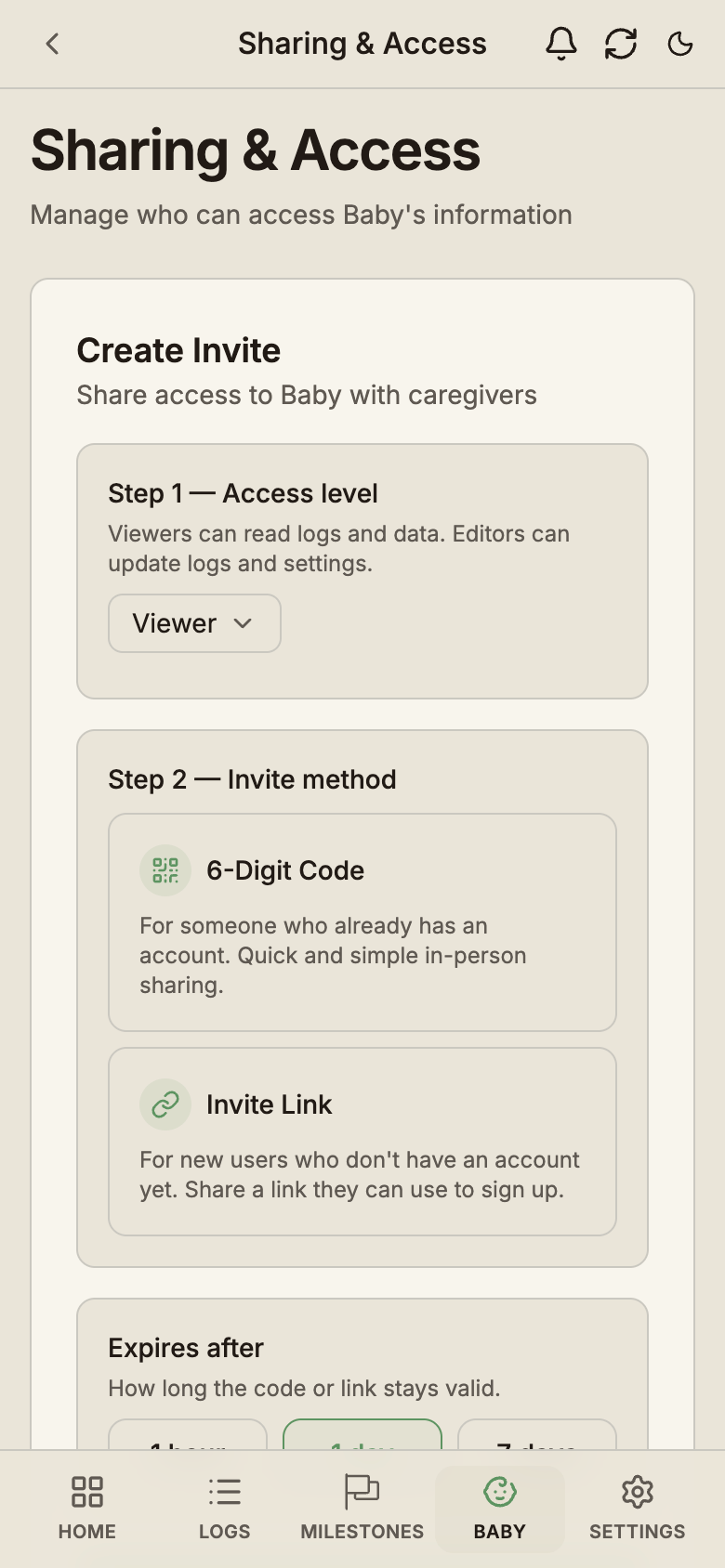
- Open Baby, pick your baby, then open Sharing & Access.
- Set the access level. Choose Editor for a partner, so they can log.
- Pick 6-Digit Code if they already use BabyLog, or Invite Link if they don't.
- For a link, pick the language their app opens in.
- Choose how long it stays valid: 1 hour, 1 day or 7 days.
Send it however you usually message, or read the code out loud. Each invite works once.
Step 3: Your partner joins
- With a link: they tap it, create their account, and join your baby with the role you picked.
- With a code: they open Baby, enter the six digits under Have a caregiver code? and tap Join with Code. A brand-new account can also choose I was invited during setup.
Your baby's history then syncs to their phone. The sharing guide covers pending invites, caregiver labels and removing access.
Roles in BabyLog: Owner, Editor and Viewer
BabyLog gives each person one of three roles: Owner, Editor or Viewer. The owner is whoever created the baby, and everyone else joins as an Editor or a Viewer.
| Role | Log and edit | Manage sharing | Suits |
|---|---|---|---|
| Owner | Yes | Yes | The parent who set the baby up |
| Editor | Yes | No | A partner, nanny or regular carer |
| Viewer | Read only | No | Grandparents or family checking in |
Editors can edit and delete any entry on the baby, including ones someone else logged. Only the owner can invite people, change roles, remove access or delete the baby. Ownership can't currently move to another account, so let the parent who will manage invites create the baby.
A caregiver can join as many shared babies as they're invited to, on any plan.
What if your partner set it up?
If your partner already set up BabyLog and you'd like to join without a code:
- Create your own account.
- Open Baby and go to Request access from someone.
- Enter the email your partner uses for BabyLog, plus an optional message.
- They approve it and choose your role.
You see nothing about their babies until they approve. This works the same whether you live together or co-parent from two homes.
iPhone and Android, together
Plenty of couples split between an iPhone and an Android phone, so check that a tracker works the same on both before you both commit.
BabyLog runs in the web browser on iPhone, Android, tablet and desktop, with the same features on each. Each of you adds it to your home screen from the browser, and it opens full screen like any other app. No app store is needed. Here's how to add it to your home screen.
When your partner logs a feed on their Android, it's on your iPhone the next time you open BabyLog.
How the sync works
Here's what happens when you save a log:
- It saves to your phone first. There's no wait on the internet, and it works with no signal.
- BabyLog sends it to the cloud in the background whenever you're connected.
- Your partner's phone picks it up when they open BabyLog, switch back to it or reconnect.
If you both edit the same entry, the most recent edit wins. That's rare in practice, because each of you is usually adding new entries.
The sync button at the top right syncs on demand. A dot on it means something is still waiting to sync.
Sharing with family who read another language
A grandparent who doesn't read English can still log feeds and nappy changes when the app speaks their language.
BabyLog runs in the six most spoken languages in Australia: English, Simplified Chinese, Traditional Chinese, Vietnamese, Hindi and Arabic. Each caregiver sets their own. When you create an invite link, pick the language first, then send it on WhatsApp or however you usually message.
The app opens in that language from their first tap. You can keep BabyLog in English while they use Vietnamese, and you're both looking at the same baby.
What sharing costs
Sharing costs nothing: shared caregivers always log free, whichever plan the owner is on.
To get the full history in Summary, Calendar, Timeline and Compare, plus checkup reports and reminders, try Pro or compare the plans on the pricing page.
What changes when you share
The 3am handover gets easier. Your partner opens the log and sees the time, the amount and any note you left.
The mental load drops. You don't have to hold the whole day in your head and relay it later.
And when someone at a family dinner asks how the baby's sleeping, you can answer from the log.
Two parents looking at the same log means nobody has to guess.
When you're ready, start free and send your partner the invite.
Common questions
Ready to start tracking?
BabyLog works on any device — iPhone, Android, tablet, or desktop. Setup takes two minutes.
Keep reading
A Nanny Log That Actually Works: One Shared Log for Every Carer
A nanny tracker and shared nanny log for families with multiple carers: mum, dad, nanny and grandparents log and see the same day in real time.

Tracking Twins: How to Log Two Babies' Feeds, Sleep and Nappies Without Mixing Them Up
A baby tracker for twins needs one record per baby. How to log feeds, sides, sleep and nappies, plus the free and Pro set-ups in BabyLog.