
Huckleberry vs Nara Baby: An Honest Comparison (2026)
Huckleberry and Nara Baby compared on everyday logging, navigation, sleep support, free features and price — and which one we'd actually pick.
Huckleberry and Nara Baby are two of the most-recommended baby trackers, and they take noticeably different approaches. Our Huckleberry vs Nara Baby verdict: Huckleberry for most families. Its glanceable home screen makes everyday logging quicker, and its sleep support is, in our view, the best of any mainstream tracker. Nara Baby suits parents who want a simpler logger, and it is free when used on one phone.
This is an honest, hands-on comparison of how the two feel day to day: logging effort, how easy it is to get an overview, sleep support, free features and price. Screenshots are from each app as of June 2026. Apps change, so treat the details as a snapshot.
At a glance
| Huckleberry | Nara Baby | |
|---|---|---|
| Overall feel | Polished, colourful, information-dense home | Clean and minimal, but large cards |
| Everyday logging | Quick from a glanceable home screen | More scrolling; amounts typed on a keypad |
| Sleep support | Standout: predictions and sleep plans | Basic sleep logging |
| Free tier | Strong: core tracking included | Free on one phone; a second caregiver's device needs the paid plan |
| Price | Sleep features cost extra | Paid plan sold monthly or as a one-off lifetime purchase |
| Getting your data out | CSV, emailed to you once a day | CSV from inside the app, via two Export Data buttons; works on the free plan |
| Our pick | ✅ Recommended | Fine if you want the simplest logger |
Everyday logging and navigation
This is where the two apps feel most different.
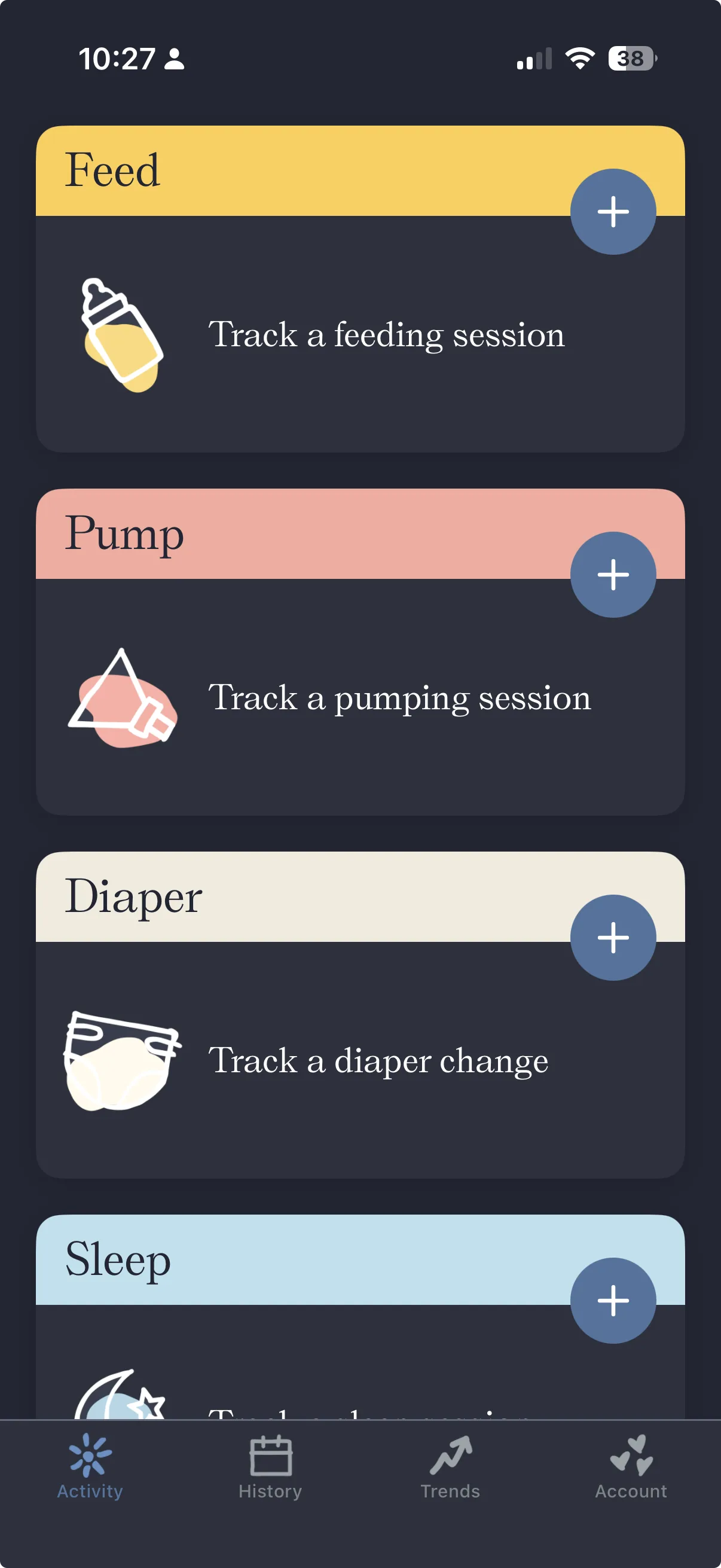
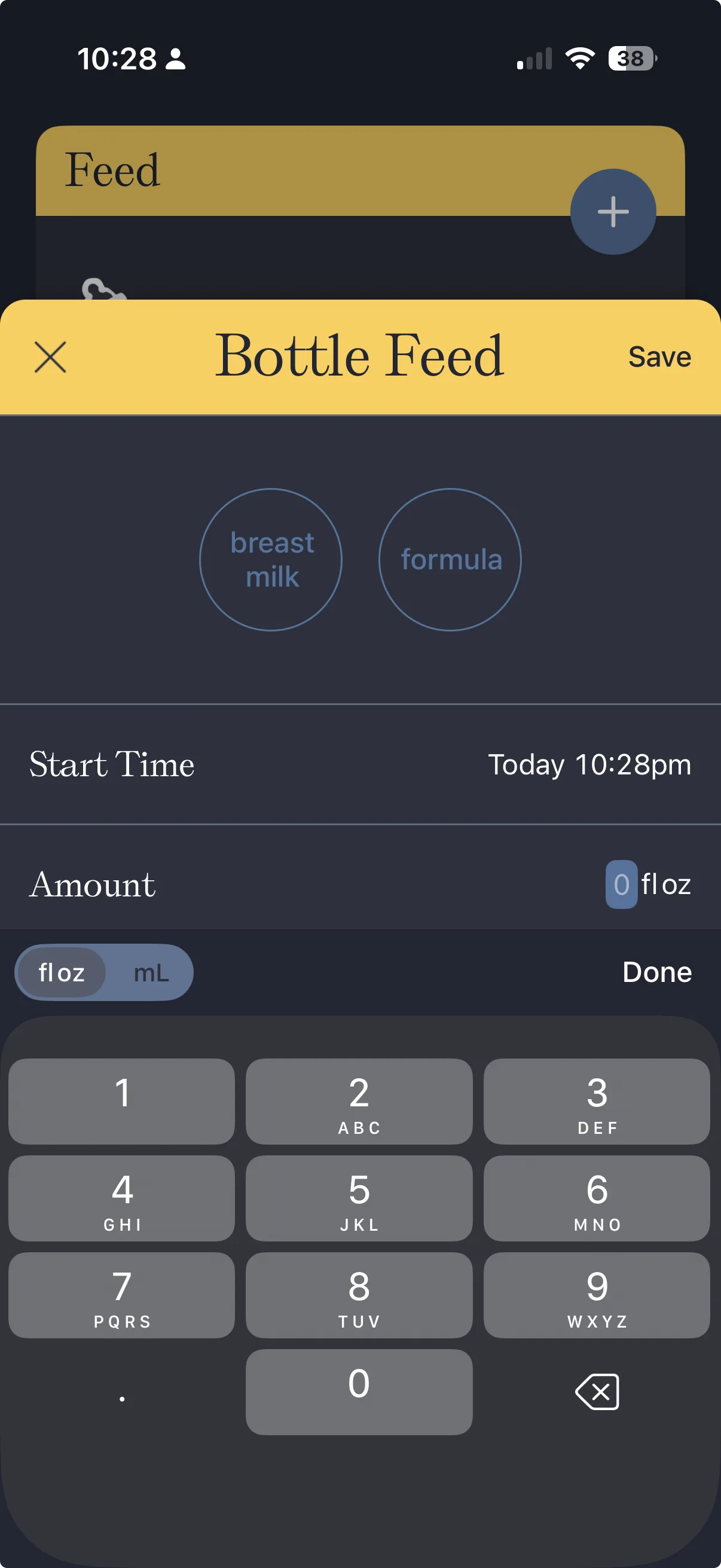
Nara Baby uses very large activity cards. They look calm, but only about three or four fit on the screen at once, so you scroll more to see your day or reach the activity you want. Logging an amount, say a bottle feed, brings up a number keypad, so you're typing values throughout the app rather than nudging them.
Huckleberry packs more onto its home screen. Each activity is a colourful card that shows its last entry at a glance: when the last feed, sleep or change was. You can take in the whole day without scrolling much, and start a log from the same place.
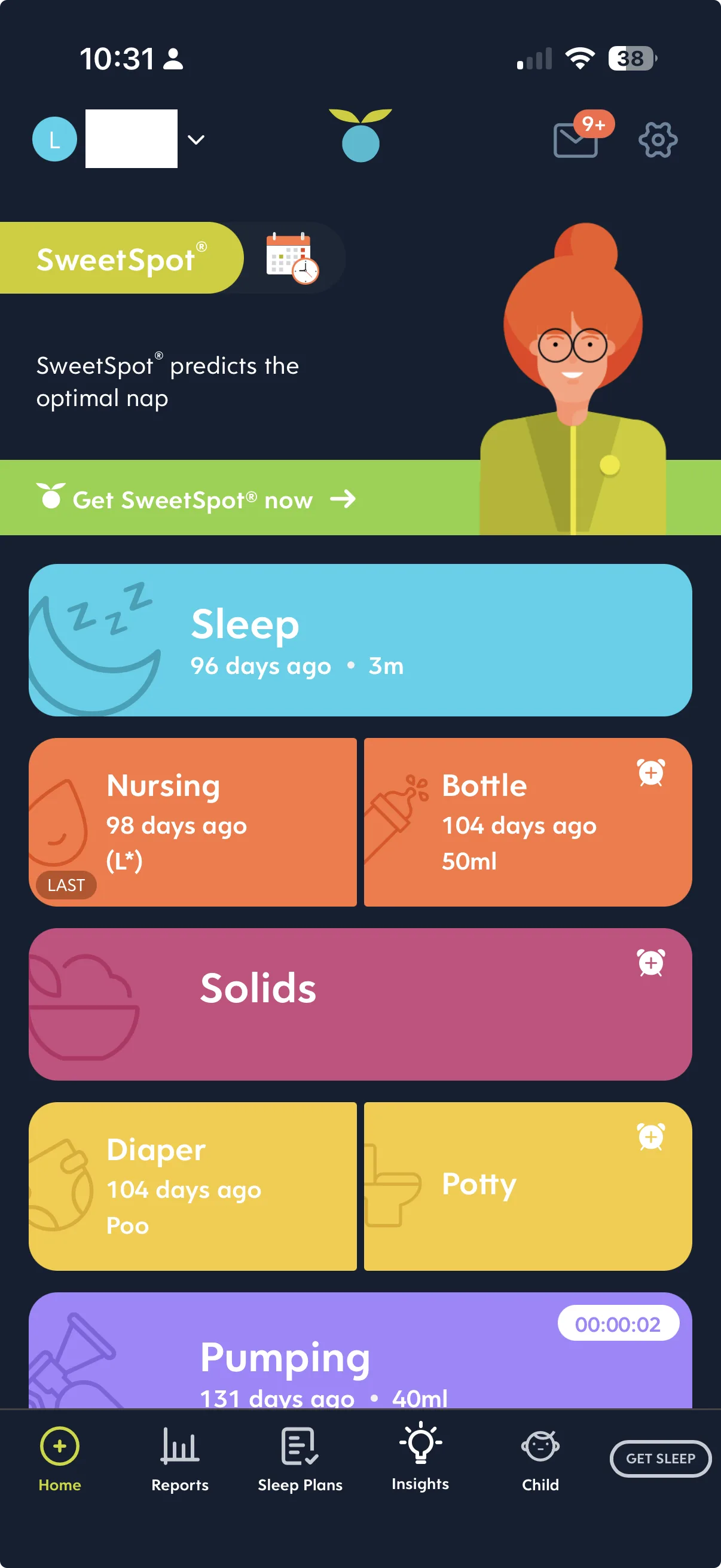
For an app you open many times a day, often one-handed, Huckleberry's denser, glanceable home is faster to live with.
Sleep support
Sleep is Huckleberry's signature strength. Alongside normal sleep logging it offers nap-timing predictions and structured sleep plans. In our view, that is the best sleep support of any mainstream tracker. If sleep is the thing keeping you up (literally), that's a real reason to choose it.
Nara Baby logs sleep, but doesn't offer an equivalent prediction-and-plan system. It's tracking, not coaching.
Free features and price
Both apps let you track the everyday basics for free, though Nara Baby is free only when you use it on one phone. The difference is at the top end: Huckleberry's deeper sleep tooling sits behind its paid tier, so you pay extra for the sleep coaching that makes it stand out.
So the two apps charge for different things. Huckleberry charges for its sleep features. Nara Baby charges once a second caregiver's device needs to sync, through a plan sold monthly or as a one-off lifetime purchase. Nara's paywall (September 2026) lists these paid-plan features: unlimited activity tracking, unlimited family and caregivers, trends and history, Apple Watch and Siri support, and age-based sleep and feeding guides. Prices vary by region and change, so check the store listing for each app.
What people are actually asking about these two
A lot of the searching around these apps ends up looking for the practical answers a forum thread gives rather than a feature list. We won't put words in anyone's mouth, but here are the questions that keep coming up, answered from using both apps ourselves.
Which one is faster at 3am? Huckleberry. Its home screen shows every activity with its last entry, so you can see where you are and start the log from the same card. Nara Baby's cards are larger, so you scroll more, and logging an amount brings up a keypad. Typing is the last thing you want at that hour.
Do I have to pay? Not to track the basics on your own phone. Both apps cover everyday logging for free, but Nara Baby's free use stops at one phone: syncing with a second caregiver's device needs its paid plan. On Huckleberry, the paid part is the sleep predictions and plans.
Can I get my data back out? Huckleberry emails you a CSV, once a day, rather than downloading it in the app. We walk through it in how to export your Huckleberry data. Nara Baby exports a CSV from inside the app, and export works on the free plan. It also has two Export Data buttons that don't export the same profile, so read how to export your data from Nara Baby before you tap one. Either way, take your history with you.
Is it worth running both? Some families do: one app for sleep guidance, another for everyday logging. It works, but it doubles the logging, and the app you actually keep using is the one you only have to open once.
The verdict
We'd pick Huckleberry over Nara Baby. It's the better-built, easier-to-use app day to day, and its sleep support is genuinely class-leading. The main caveats are price (the best sleep features are paid) and a slightly busier interface.
Nara Baby is still a reasonable choice if you specifically want the most stripped-back logger, you log on one phone, and you don't care about sleep predictions. But for most families who'll be opening the app dozens of times a day, Huckleberry is the one we'd recommend.
Switching from one to the other? Take your history with you first. Nara Baby's two Export Data buttons don't export the same profile, and Huckleberry emails its CSV and allows one export a day, so plan the export before you stop logging in the old app.
If Nara is not the alternative you had in mind, we compared Huckleberry with Baby Daybook and Huckleberry with Glow Baby too. The wider field, and who each app suits, is in our Huckleberry alternatives guide.
Common questions
Ready to start tracking?
BabyLog works on any device — iPhone, Android, tablet, or desktop. Setup takes two minutes.
Keep reading

BabyLog vs Huckleberry: Which Baby Tracker Suits Parents in Australia?
A fair side-by-side comparison of BabyLog and Huckleberry — sleep support, daily logging effort, reviewing the day, caregiver sharing, offline use, data export and pricing — for families parenting in Australia, deciding between them.
BabyLog vs Nara Baby: Calm and Minimal vs Calm and Operational
A fair side-by-side comparison of BabyLog and Nara Baby — daily logging effort, reviewing the day, caregiver sharing, offline use, data export and multilingual support — for parenting in Australia, when you want a calm baby tracker.