
Feeding and Nappy Log: When the Notes App Starts Working Against You
Plenty of parents start tracking feeds and nappies in the Notes app, a sticky note on the fridge, or by texting their partner. Here's where that breaks down — sometimes by week two, sometimes by month five — and what a proper feeding and nappy log gives you in return.
Almost every parent starts the same way.
A note on your phone. A sticky note on the fridge. A whiteboard in the kitchen. A long Messages thread with your partner that mostly reads: "7:14 left side 12 min. wet nappy. she's been a champion."
That works at first. For some parents it keeps working — kind of — for weeks or even months. The information is technically all there.
But somewhere along the way the days blur, the entries stop being timestamped properly, the sticky note falls off, and you find yourself at the child health nurse appointment saying "I think she's feeding every three hours, maybe?"
Here's what happens at that point, and why a proper feeding and nappy log fixes it without making the workflow heavier.
Where the Notes app and texts break first
It's not that the Notes app is bad. It's that babies don't fit into a flat list.
Time-stamps disappear. You think you'll remember the time, you don't. By the time you go back to type "7:14 am — left side", your baby is asleep on your chest and you've forgotten which side and how long.
The other parent doesn't have the log. If you wrote the note, your partner is still asking "when was the last feed?" — defeating the entire reason you started writing things down.
You can't see patterns. A list of one hundred entries on day twelve is unreadable. You can't tell whether feeds are getting closer together, whether wet nappies are dropping, whether something has changed this week.
Your nurse asks for data. At every check-up someone asks "how often are wet and dirty nappies?" or "how long are the feeds?". With a notes app you guess. With a log you scroll. If you're wondering what a normal answer looks like, see how long a newborn breastfeed usually takes.
Sharing with grandparents doesn't happen. Notes is a single-account app. If your mother-in-law is watching the baby for the afternoon, she has no way to add to your log — she'll just remember and tell you later.
None of this is a disaster. It's just that the small frictions add up to maybe a couple of times a day, every day, for months. A dedicated log removes them.
With twins, every one of these frictions happens twice. Our guide to tracking twins covers keeping a separate record for each baby.
Here's a real example from our own household. The left screenshot is Apple Notes during the notes-app phase — feeds and nappies on day 154 and day 155, typed in line by line as they happened. The right screenshot is the same baby a few weeks later on day 175, after we switched to BabyLog. Same routine, same information — very different to read at 3am:
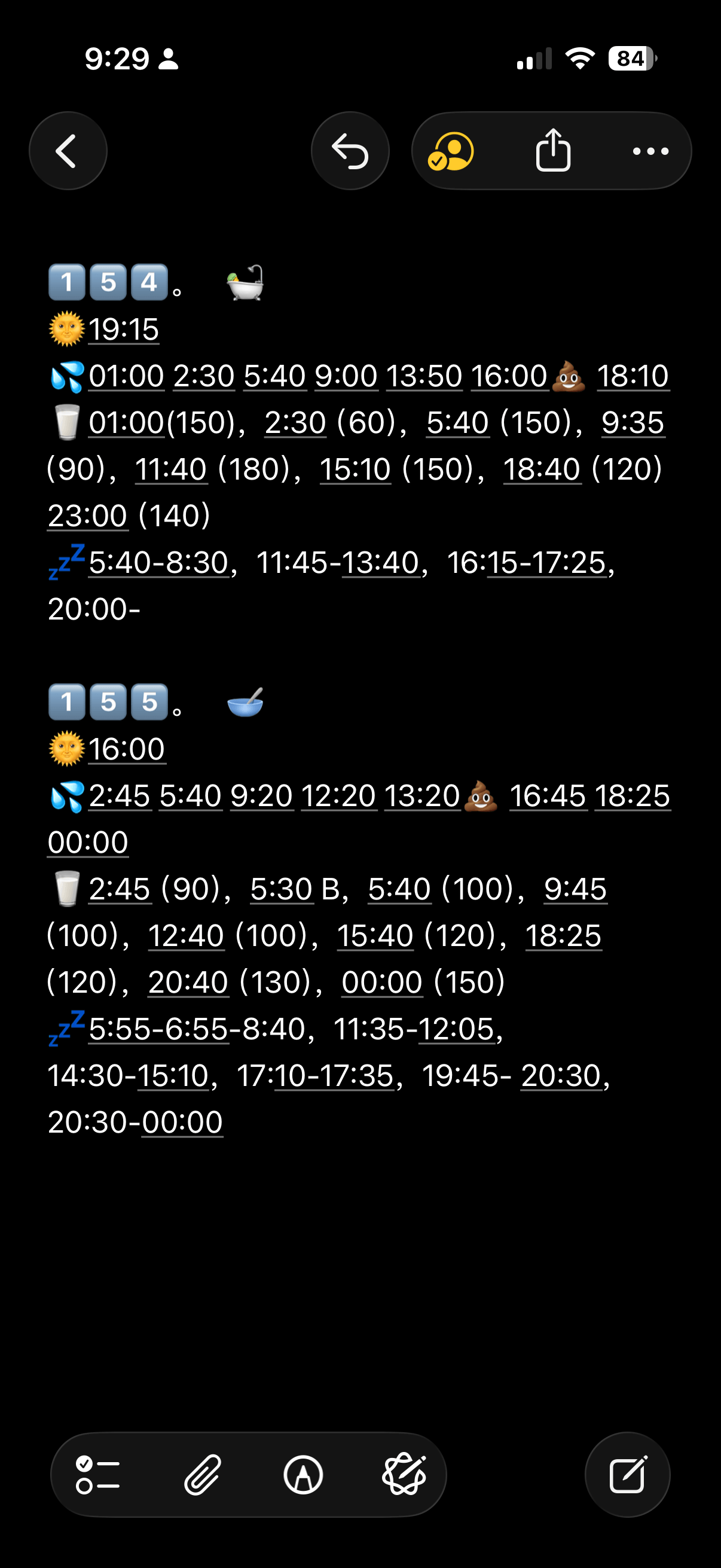
Apple Notes — day 154 and 155. Times typed by hand, no totals, no patterns.
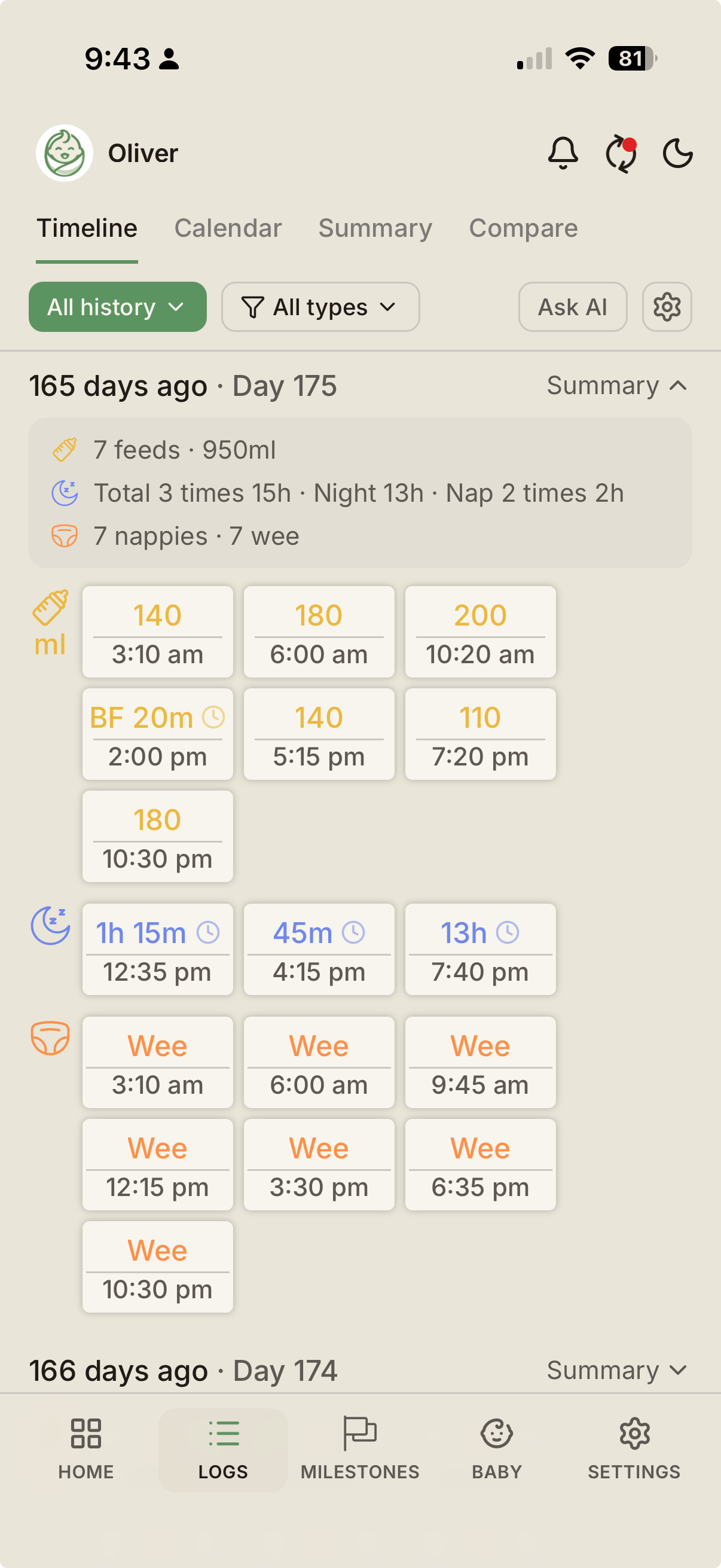
BabyLog — day 175, after the switch. Same routine, with totals and a clear timeline.
The Notes app version still has the information. It just takes a moment of mental arithmetic every time someone asks "how many wet nappies today?" — and that moment is harder to find when a baby is on your chest. The right-hand version answers it instantly.
What a proper feeding and nappy log gives you
A good baby tracker doesn't ask you to write down more information. It asks you to write down less — but in a structured way.
- One tap per nappy. Pick wet, dirty, or both. Optionally choose a colour. Done. Time-stamped automatically.
- One tap per feed. Start a timer for breastfeeding, log a volume for bottles. Pick a side. Done. Time-stamped automatically.
- Both parents see it instantly. No "did you log that?" texts.
- Day rollups. "Today: 8 feeds, 6 wet nappies, 2 dirty nappies" — without you adding anything up.
- Patterns become visible. "She used to wake every 2.5 hours, now it's every 4." That kind of insight is impossible to see from a flat list of notes.
- The child health nurse appointment becomes easy. Hand them the screen, or copy a week's summary into a message.
The hardest part of switching is the first day. By day three the muscle memory is there.
What is not a good reason to switch
A baby tracker isn't a fix for everything. Don't switch because:
- You want more reminders. Reminders don't change baby behaviour, and they can become noise. Most parents settle on one or two.
- You want predictions. Predictions are educated guesses. They're not a schedule.
- You want a "score" for the day. Most score systems are gamified anxiety. A good tracker shows your patterns and lets you decide if they're normal.
Switch because you want less mental load and clearer handoffs, not because the app promises to replace your intuition.
How to switch from notes or texts to a real log
You don't have to backfill weeks of history. Most parents don't. The goal is to make the next week easier, not to re-enter the last one.
Option A — Start fresh. From the next feed, log everything in the new app. Within two days you'll have enough to start seeing patterns.
Option B — Backfill the last 24 hours. If you have rough times in your phone Notes or Messages, type the last day into the new app so you don't feel like you've lost the data you already had.
Option C — CSV import. If you've been keeping a spreadsheet, most decent trackers can take a CSV. Map the columns, import, then keep logging forward.
Whichever you pick, the only entry that matters is the next one — because that's the one your partner needs to see at 3am.
How BabyLog handles the switch
We built BabyLog specifically because the Notes-app phase wasn't working for our own household.
- The home screen shows the last feed, last sleep, and last nappy at a glance — the three questions your partner is always about to ask.
- Logging is one tap with one optional follow-up. Feed timers, nappy types, and colour options are all on the first screen.
- Both parents see every entry instantly across iPhone and Android. There are no per-seat sharing fees — see the sharing feature page and the Free vs Pro split.
- BabyLog can import a CSV if you've been keeping a spreadsheet, and it can export a full CSV at any time if you ever want to move again.
- The Ask AI feature lets you copy your structured logs into ChatGPT, Claude, Gemini, or Grok if you want a second pair of eyes on a pattern.
If you want a single page that's just about logging feeds and nappies side by side, see the newborn feeds and nappies tracker page.
Bottom line
The Notes app is fine for week one. By week three it's working against you — costing you small amounts of mental load many times a day.
A proper feeding and nappy log doesn't ask for more effort. It asks for the same effort, in a structured way, shared with the people who actually need to see it.
BabyLog is free to start. The switch costs you about three minutes — see pricing for what Free covers and start tracking when you're ready.
Ready to start tracking?
BabyLog works on any device — iPhone, Android, tablet, or desktop. Setup takes two minutes.
Keep reading
App to Track Newborn Feedings and Nappies: What to Look For
A short buyer's guide for parents looking for an app to track newborn feeds and nappies — six qualities that matter day-to-day, and how to evaluate any tracker against them.

How to Keep Both Parents in Sync with Baby Care Tracking
Sleep-deprived parents shouldn't have to text 'when was the last feed?' — here's how BabyLog keeps everyone on the same page across iPhone and Android.