
Nara Baby Alternatives: What Changed at Nara, and Where to Go If You Don't Want to Pay
Nara Baby now charges to sync a second phone. AUD prices checked September 2026, five Nara Baby alternatives compared, and how to move your data.
The right Nara Baby alternative depends on why you're leaving. On the existing Nara account we tested in September 2026, one phone still logged free. Syncing a second caregiver's phone needed the paid plan: A$9.99 to A$14.99 a month in Australia, or a one-off lifetime purchase. Other trackers, including Huckleberry, sync a second phone on their free plans.
Prices and plan details here were checked on 23 September 2026, in the Australian App Store and on each developer's own site. Prices can change at any time. For current pricing, see the Nara Baby App Store listing(opens in a new window).
What changed at Nara Baby?
Nara Baby used to be completely free. It now sells a paid plan, and in our test a family logging on two phones needed it.
In July 2025, Nara's own FAQ answered the question "Are there ads or in-app purchases?" with "No. The app is completely free!"
By September 2026, the same FAQ page gives a price: "$9.99/month or $99.99 one-time (lifetime), with occasional promotions offered to qualifying users." Here is what that looks like in Australia.
Nara Baby's paid plan, checked 23 September 2026:
- Monthly: A$9.99 or A$14.99 in the Australian App Store.
- Lifetime (pay once): A$79.99, A$99.99, A$129.99 or A$149.99 in the Australian App Store.
- Offer on our test account: $9.99 a month or $99.99 for lifetime, marked down from $14.99 and $149.99, under the heading "Savings for existing Nara families".
- Who one payment covers: "your whole caregiver circle", according to Nara's FAQ.
- Paid-plan features on the paywall: Unlimited activity tracking, unlimited family and caregivers, trends and history, Apple Watch, Siri and Live Activities, easy data export, and age-based sleep and feeding guides.
The App Store lists several prices for each plan because promotions change what you're offered. The paywall prices on our test account match price points on the Australian listing.
Prices can change at any time. For current pricing, see the Nara Baby App Store listing(opens in a new window).
Two things count in Nara's favour. One payment covers every caregiver in the family, and the lifetime option means you pay once. If you like Nara and the price suits you, staying is the simplest fix.
Is Nara Baby still free?
On the existing Nara account we tested in September 2026, logging on one phone was still free. Syncing with a second caregiver's phone needed the paid plan, sold monthly or as a one-off lifetime purchase.
Our test used a Nara family account that was already set up. Nara's FAQ now answers "Is Nara Baby a paid app?" with "Yes", so a new account may be offered something different. Check the paywall in your own app before you decide.
Export still works on a free account. We exported a child's CSV from a free Nara account in September 2026, even though the paywall lists "easy data export" among the paid-plan features. So your history can come with you whichever way you decide.
That makes the choice fairly simple:
- One parent does all the logging on one phone. Nara's free use may still cover you.
- Two of you log on your own phones. You either pay Nara, or move to an app whose free plan syncs a second phone.
What to look for in a replacement
- A second caregiver's phone, free. This is usually why families leave. Check how the sharing works, too. Some apps have everyone sign in to one shared account; others give each caregiver their own login.
- A way to bring your Nara file in. Nara exports a CSV. A new app that imports CSV, and exports its own, means you're never stuck in one app again.
- Logging without signal. Night feeds happen in rooms with poor reception. An app that saves entries on the phone first and syncs later won't drop a 3 am feed.
- Apple Watch, if you log from your wrist. Nara's paid plan includes Apple Watch logging, so check that the replacement has a watch app if you rely on it.
Apps like Nara Baby, side by side
- Nara Baby: Free plan: logging on one phone (existing account, our test). Second caregiver's phone: paid plan. Data out: CSV export, works on a free account. Paid: A$9.99 or A$14.99 a month; lifetime A$79.99 to A$149.99. Apple Watch: yes, on the paid plan.
- Huckleberry: Free plan: everyday logging, reports, syncing devices. Second caregiver's phone: free, with caregivers signing in to the same account. Data out: CSV, emailed, once a day. Paid: Plus A$16.99 a month or A$95.99 a year; Premium A$20.99 a month or A$169.99 a year. Apple Watch: yes.
- Baby Tracker (Nighp): Free plan: core tracking, with ads. Second caregiver's phone: a sync group joined with one shared email and password; no fee stated. Data out: PDF export. Paid: Remove Ads A$7.99; Plus A$9.99 a month or A$79.99 a year. Apple Watch: yes.
- Baby Daybook: Free plan: everyday logging. Second caregiver's phone: Premium ("Family sync"). Data out: PDF export is Premium. Paid: Premium A$2.99 to A$7.99 a month, A$16.49 to A$49.99 a year, lifetime A$83.99 or A$139. Apple Watch: yes.
- Glow Baby: Free plan: everyday logging. Second caregiver's phone: not stated on the listing. Data out: not described on the listing. Paid: Premium A$26.49 to A$99.99. Apple Watch: yes.
- BabyLog: Free plan: all 12 log types, caregiver sharing, CSV import and export, offline logging. Second caregiver's phone: free, with each caregiver joining on their own account. Data out: CSV export, free. Paid: Pro A$8 a month or A$64 a year. Apple Watch: no.
Where each detail comes from:
- Prices are the in-app purchases on each app's Australian App Store listing, read on 23 September 2026. Huckleberry's tiers are matched to month and year from its own pricing page, whose AUD prices match the App Store list. Glow Baby's listing doesn't label which price is monthly and which is yearly, so the list gives the range.
- Huckleberry's pricing page lists "Sync multiple devices to keep caregivers in the loop" on its free plan. The FAQ on the same page says caregivers share by signing in to the same account on each phone.
- Baby Tracker's FAQ has each device join a sync group with the same email and password, and names no fee for it. Check inside the app before you rely on it.
- Baby Daybook's Premium page lists Family sync, the timeline's full history, growth charts and PDF export among its paid features.
- Glow Baby's listing says it is "free to download and use", and its Premium adds community extras such as private messaging and comparative insights.
Prices can change at any time. For current pricing, see the Nara Baby(opens in a new window), Huckleberry(opens in a new window), Baby Tracker(opens in a new window), Baby Daybook(opens in a new window) and Glow Baby(opens in a new window) App Store listings, and BabyLog pricing.
Which alternative suits which family?
Sleep is the hard part. Huckleberry. Its free plan logs the day and syncs caregivers on one shared account. Its SweetSpot nap predictions start from 2 months and sit on the paid plan (checked September 2026). We compared the two apps directly in Huckleberry vs Nara Baby.
You'd rather pay once than monthly. Nara's own lifetime plan is the obvious one, and your history stays where it is. Baby Daybook also sells a lifetime Premium, listed at A$83.99 or A$139.
You log from your wrist. Nara (on its paid plan), Huckleberry, Baby Tracker, Baby Daybook and Glow Baby all list Apple Watch support.
You want a no-frills logger. Baby Tracker (Nighp) keeps core tracking free with ads, and A$7.99 removes them. Its sync group shares one login across devices.
Prices can change at any time. For current pricing, see the Baby Daybook(opens in a new window) and Baby Tracker(opens in a new window) App Store listings.
Two of you log on your own phones, and you'd rather not pay. This is the family BabyLog suits. Your partner joins with a six-digit invite code and their own account, their phone syncs on the free plan, and CSV import with an Import with AI helper brings your Nara history across.
You can start free in the browser, with no card. The partner sharing guide shows how the invite and the roles work.
BabyLog runs in the browser and installs to the home screen on iPhone or Android. It has no Apple Watch app. We built BabyLog, so weigh our view of it with that in mind. The full head-to-head is in BabyLog vs Nara Baby.
Moving your Nara history
Export before you stop logging in Nara. Nara Baby exports one child per CSV, and the reliable route is Account → Family → your child → Export Data, at the very bottom of the child's page.
The other Export Data button, under the avatar on the Activity tab, exports whichever profile is selected. That can be your own postpartum profile, with none of your baby's entries in it. Our guide to exporting your Nara Baby data walks through both routes and what's inside the file.
BabyLog imports CSV in its own column layout and has no built-in mapping for Nara's file, so the file needs one conversion step. The Import with AI tab writes a prompt for that step. You paste the prompt and your Nara CSV into ChatGPT or Claude, and the AI returns the rows in BabyLog's format.
- Export each child from Nara. Open the file and check the profile name and the date range.
- Set up BabyLog. Create a free account and add your baby. It takes about two minutes.
- Copy the prompt. Open Baby → your baby → Data → Import with AI and tap Copy. Paste it into your AI along with the Nara file.
- Preview, then confirm. On the Import & Export tab, paste the CSV the AI returned and tap Preview & Import. Nothing is saved until you confirm the rows.
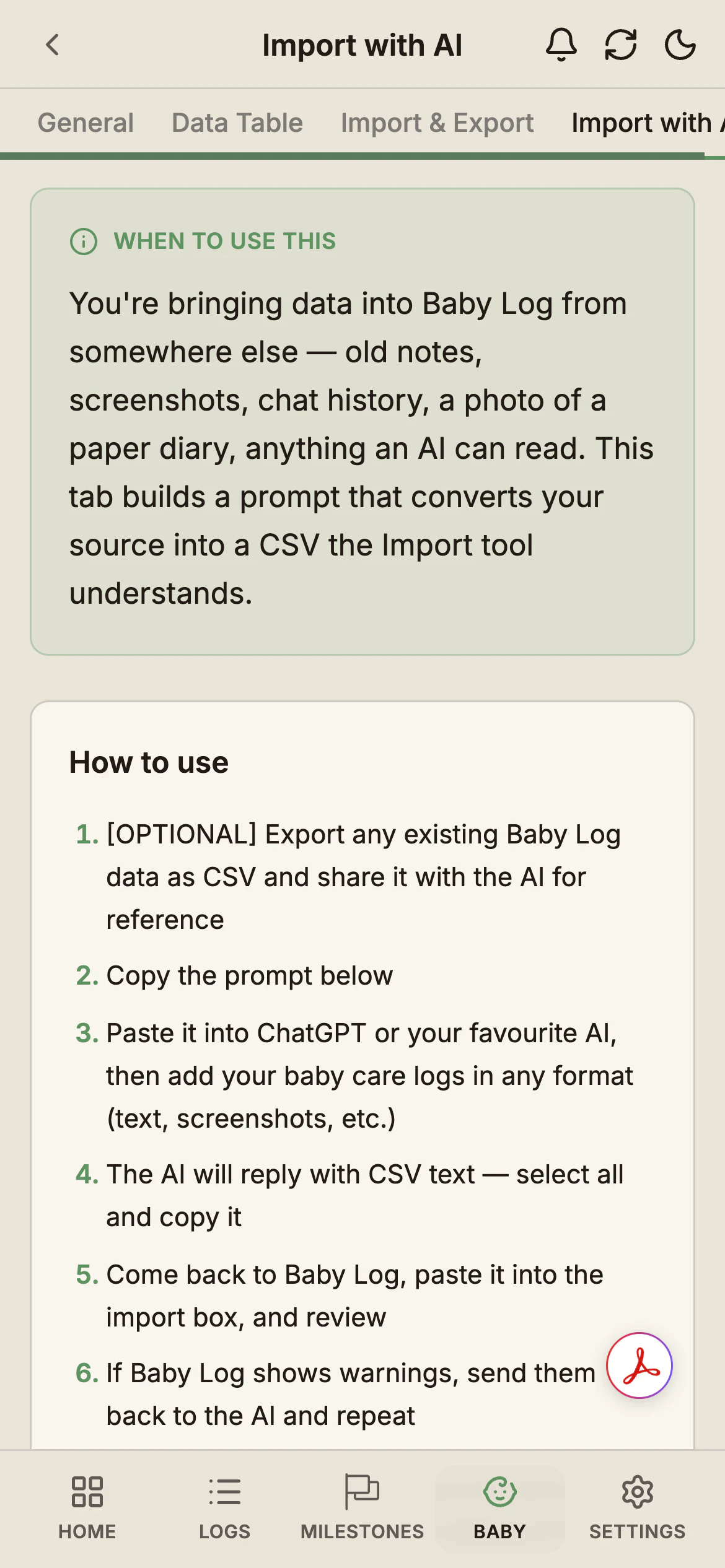
Your Nara file goes to whichever AI you paste it into. If you'd rather not share it, the import and export guide shows how to match the columns yourself in a spreadsheet.
Once the import lands, every entry sits in the Data Table on the free plan, with no time limit, where you can view, edit or delete it.
Growth charts plot the weights and lengths you brought across against WHO-standard percentiles, across the whole history. Summary, Calendar, Timeline and Compare go back 14 days on Free, so to chart the months you brought across, upgrade to Pro.
Leaving a different app? We've written the same kind of guide for Huckleberry alternatives and Glow Baby alternatives.
Common questions
Ready to start tracking?
BabyLog works on any device — iPhone, Android, tablet, or desktop. Setup takes two minutes.
Keep reading

How to Export Your Data From Nara Baby (CSV, Step by Step)
Nara Baby has two Export Data buttons that don't export the same profile. Where the CSV lives, which route exports your child's data, what's inside.
BabyLog vs Nara Baby: Calm and Minimal vs Calm and Operational
A fair side-by-side comparison of BabyLog and Nara Baby — daily logging effort, reviewing the day, caregiver sharing, offline use, data export and multilingual support — for parenting in Australia, when you want a calm baby tracker.